
Click — zoom.
Click — back. ⚡
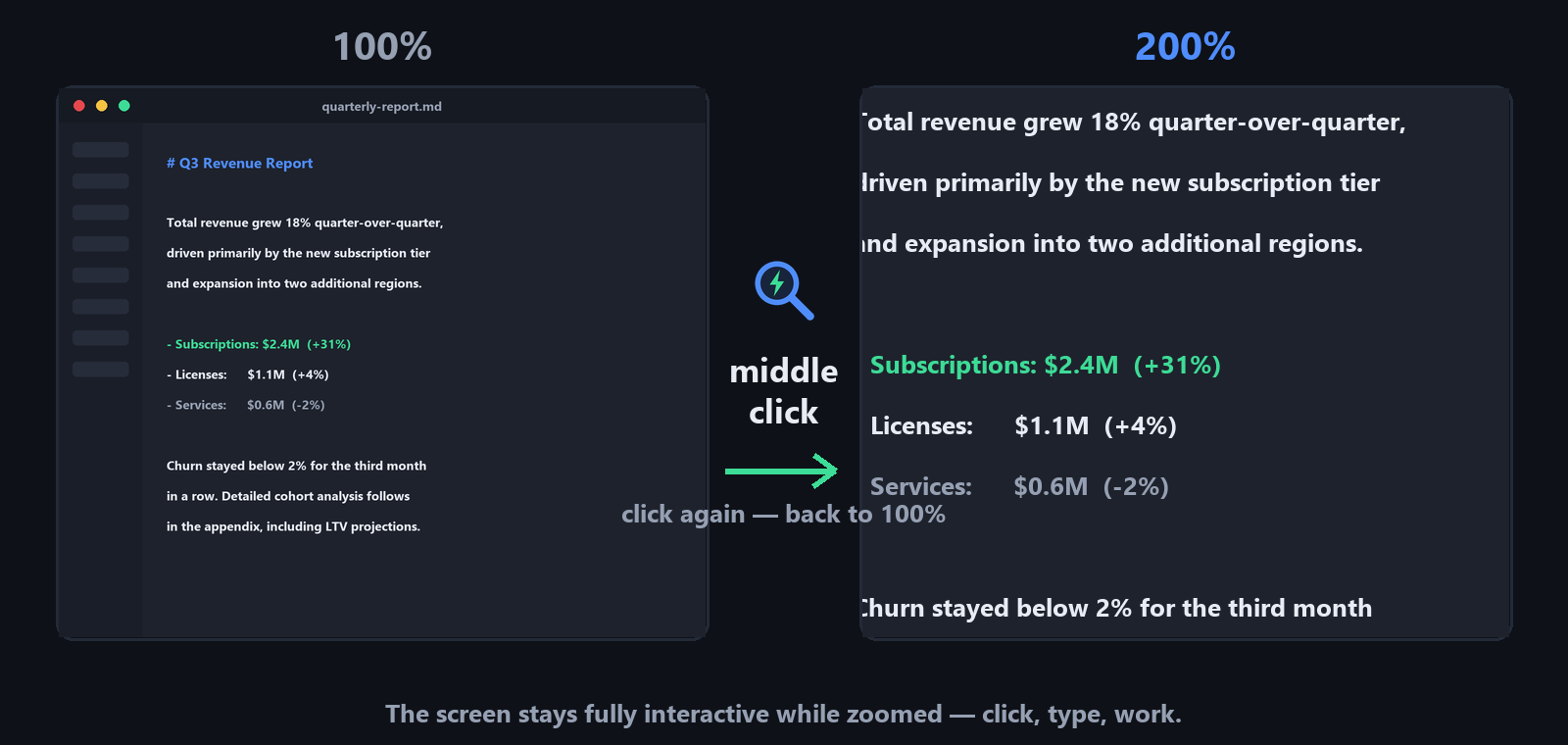
One mouse button is the whole interface. Middle click — the screen zooms to 200%. Middle click again — you're back. No key combos, no toolbars, no widgets. And while zoomed, the screen stays fully interactive: click, type and work as usual. Free, for Windows and Linux.
Open source · no ads · prefer to install nothing? grab the portable version · view on GitHub
winget install magnifysnap
While zoomed, move the cursor to a screen edge — the view glides along.
“I just wanted to look closer and keep working. The built-in magnifiers demand key combos to start, more combos to zoom, and park a toolbar on the screen. Third-party tools were heavy, fiddly or both. I searched for something truly fast and convenient — and found nothing. So I built it.”
Why Magnify.Snap
Instant toggle
One press zooms in, another snaps back. Hold the button to peek even closer for a moment — release and it settles. Rebind to any button, key or combination.
Zero friction
The screen stays fully interactive while zoomed — click buttons, type text, drag windows. It's your desktop, just bigger.
Smart panning
The view follows your cursor only when it reaches a screen edge — smooth, predictable, configurable speed.
Native zoom engine
Windows Magnification API, GNOME magnifier or KWin Zoom — hardware-accelerated magnification, no overlays or lag.
Your look
Follows the system theme out of the box, with Light and Dark modes one click away. Zoom level from 125% to 800%.
Tiny and honest
Around 20 MB, one process, no ads and no telemetry. Install it properly or run the portable file — your choice. Open source: inspect every line on GitHub.
Simple on the surface, tunable underneath
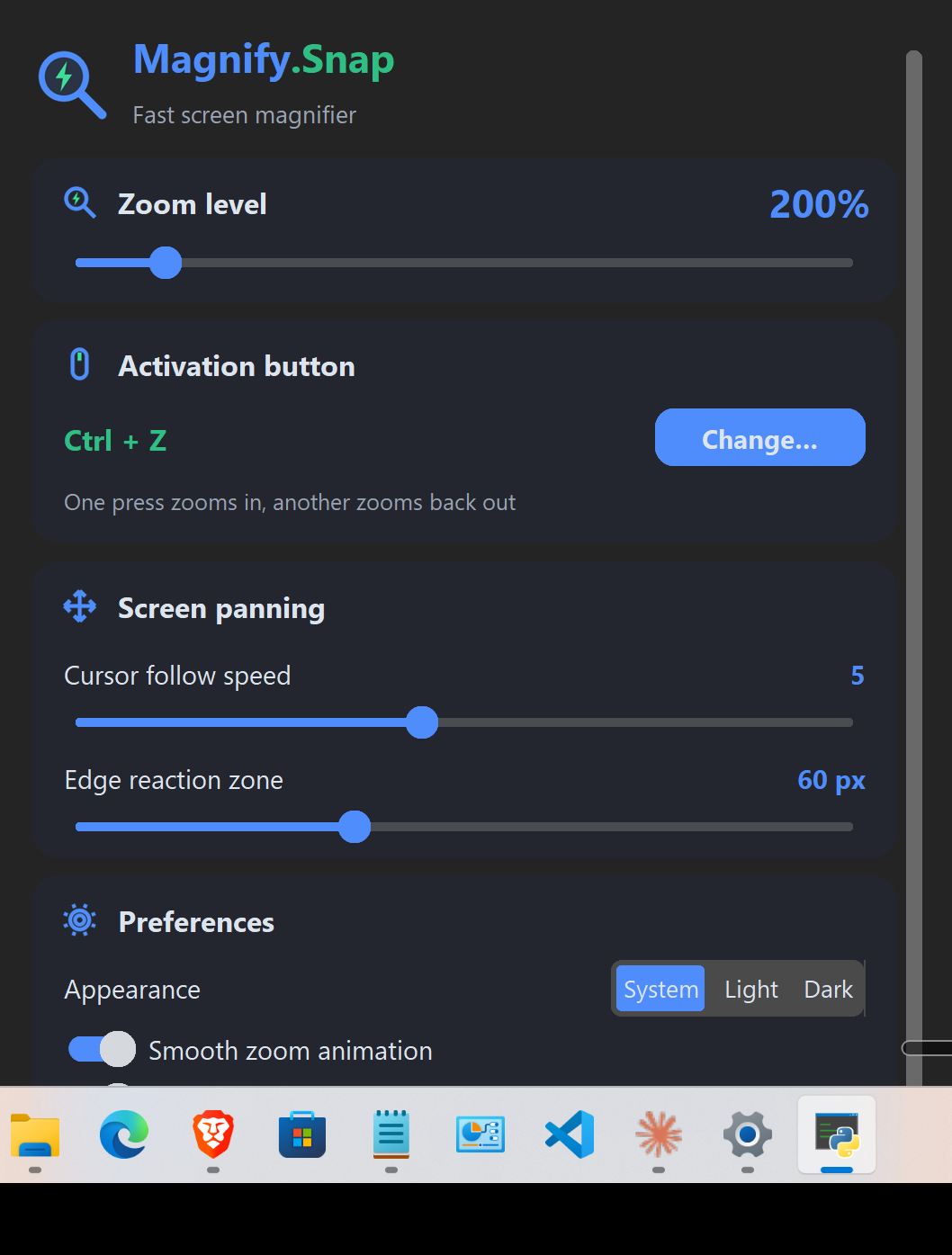
Magnify.Snap works out of the box — install nothing, configure nothing, middle click and go.
When you want more, the settings are one tray-click away: zoom level from 125% to 800%, a hold-to-peek boost level, any mouse button / key / combination as the trigger, cursor-follow speed, light & dark themes, autostart.
No ads. No telemetry. No account. Install it or carry it on a stick — both work.
Questions people ask
Is Magnify.Snap really free?
Yes. Free and open source (MIT license), no ads, no telemetry, no paid tiers. Take the installer, which adds it to the Start menu, or the single portable file, which installs nothing at all. The only network request it makes is an optional daily update check against GitHub — one click updates in place, and the check can be turned off in settings.
How is it different from the built-in Windows Magnifier?
The built-in magnifier wants key combos to start, zoom and quit, and parks a toolbar on your screen. Magnify.Snap is one mouse button: middle-click zooms to 200%, another click snaps back, holding the button peeks even closer. Nothing else appears on screen.
Can I still click and type while zoomed?
Yes — magnification happens at the OS compositor level, so the screen stays fully interactive: click, type, drag windows as usual.
Can I use a different button or key?
Any mouse button, key, or combination with Ctrl/Alt/Shift/Win. Assign it by physically pressing it in the settings.
Does it work on Linux?
Yes — GNOME (built-in magnifier) and KDE Plasma (KWin Zoom). Global input capture works best on X11.
Code signing policy
Committers and reviewers. Magnify.Snap is maintained by its author, violet2code, who is the sole committer and reviewer. All changes land in the public GitHub repository and are visible in its commit history.
Approvers. Releases are approved and published by the same maintainer, who holds the project leadership role. The account is protected with multi-factor authentication.
Builds. Release binaries are produced from the public source by the project's GitHub Actions workflow, and every published file lists its SHA-256 checksum on the releases page.
Privacy. See the privacy policy. In short: the application collects no personal data and makes no network request other than an optional daily version check against the GitHub API, which can be switched off in its settings.
Up and running in a minute
Download the file for your OS with the buttons above.
Run it. The app minimizes straight to the system tray — look for the blue magnifier icon.
Middle-click anywhere to zoom. Click the tray icon to open settings and make it yours.